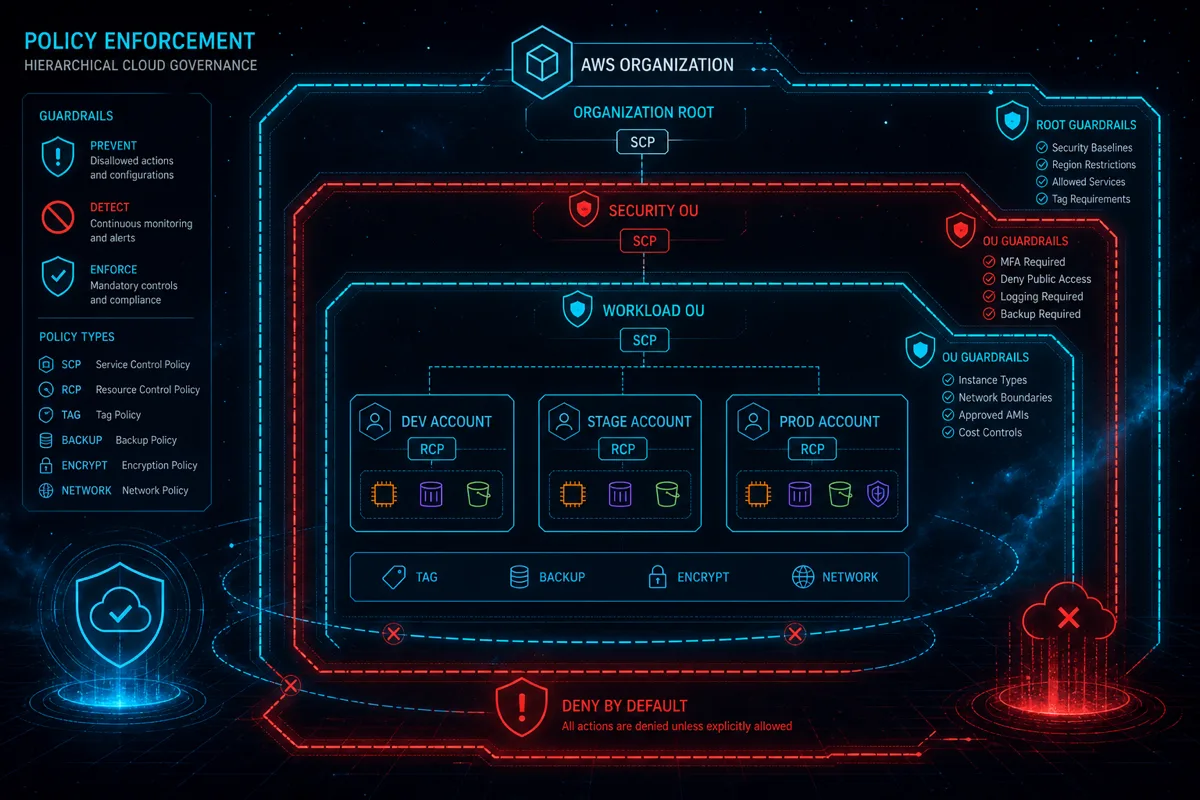
Service Control Policies (SCPs) are AWS Organizations policies that define the maximum permissions available to IAM principals in member accounts. In multi-account federal cloud architectures — which are the standard deployment model for FedRAMP and DoD IL4/IL5 environments — SCPs are the primary mechanism for enforcing security guardrails, data residency requirements, and compliance boundaries that cannot be overridden by individual account administrators.
Understanding SCP design and implementation is essential for federal cloud architects responsible for multi-account AWS GovCloud environments.
What Service Control Policies Actually Do
SCPs do not grant permissions — they define the boundary of what permissions can exist. An SCP attached to an Organizational Unit (OU) or individual account specifies which actions are allowed or denied for all IAM principals in that account (including root). IAM policies within the account further restrict what's available within the SCP's permitted scope.
The effective permission for any IAM principal is the intersection of what the SCP allows AND what the IAM policy grants. If the SCP denies an action, no IAM policy in the account can override that denial. This makes SCPs a powerful preventative control — they can prevent account administrators from granting permissions that violate organizational security policy.
What SCPs do NOT affect: - AWS service-linked roles (used by AWS services themselves) - Actions taken by the management account (SCPs don't restrict the management account) - Resource policies (like S3 bucket policies) — but SCPs do control what principals in the account can do, which indirectly affects what resource policies those principals can configure
GovCloud-Specific SCP Considerations
AWS GovCloud is a separate partition from standard AWS — services, regions, and some ARN formats differ. SCP design for GovCloud requires awareness of:
GovCloud region names: us-gov-west-1 and us-gov-east-1 are the GovCloud regions. SCPs that restrict to specific regions must use GovCloud region names. A common SCP pattern — denying all actions outside specific regions — looks like:
{
  "Effect": "Deny",
  "Action": "*",
  "Resource": "*",
  "Condition": {
    "StringNotEquals": {
      "aws:RequestedRegion": ["us-gov-west-1", "us-gov-east-1"]
    }
  }
}
This prevents workload accounts from provisioning resources in standard commercial AWS regions — a critical guardrail in environments where accidental cross-partition resource creation would violate authorization boundaries.
Service availability in GovCloud: Not all AWS services are available in GovCloud. SCPs that deny specific services for security reasons must account for GovCloud's service availability — denying an unavailable service adds no security value and may confuse administrators.
Common SCP Patterns for Federal Cloud Environments
Data residency enforcement: Prevent resource creation outside authorized GovCloud regions. The region-restriction SCP example above implements this pattern.
Prevent disabling security services: Deny the ability to disable GuardDuty, Security Hub, Config, or CloudTrail in member accounts. This ensures that security monitoring cannot be circumvented by account administrators.
{
  "Effect": "Deny",
  "Action": [
    "guardduty:DeleteDetector",
    "guardduty:DisassociateFromMasterAccount",
    "securityhub:DisableSecurityHub",
    "config:DeleteConfigRule",
    "cloudtrail:DeleteTrail",
    "cloudtrail:StopLogging"
  ],
  "Resource": "*"
}
Prevent root account usage: While best practice prohibits root account use, SCPs can deny all actions taken by the root user except for specific emergency break-glass procedures.
Enforce encryption requirements: Deny creation of specific resource types without encryption enabled — for example, denying S3 bucket creation without default encryption or RDS instance creation without storage encryption.
Restrict access to specific services: In environments where only specific AWS services are authorized for use (common in DoD FedRAMP boundaries), SCPs can restrict member accounts to only the authorized service set.
Prevent public resource creation: Deny creation of public-facing resources (public S3 buckets, public load balancers without specific tagging) that would place resources outside the authorization boundary.
SCP Inheritance and OU Structure
SCPs attach to the root, OUs, or individual accounts in your AWS Organization. Policies are inherited down the hierarchy — an SCP on the root applies to all accounts; an SCP on an OU applies to that OU and all nested OUs and accounts.
A typical federal cloud OU structure:
Root (organization-wide SCPs: region restriction, disable security services protection)
├── Core OU
│   ├── Logging account (centralized CloudTrail, CloudWatch, Security Hub)
│   └── Security tooling account (GuardDuty delegated admin, Security Hub admin)
├── Workload OU
│   ├── Production OU (SCPs: restrictive, no experimental services)
│   │   └── Production workload accounts
│   └── Non-Production OU (SCPs: slightly less restrictive)
│       ├── Staging accounts
│       └── Development accounts
└── Sandbox OU (minimal SCPs, for exploration)
This structure allows SCPs to be applied at appropriate levels — organization-wide security guardrails at root, environment-specific restrictions at the OU level.
SCP Testing and Change Management
SCP errors have broad blast radius — a misconfigured SCP can prevent all IAM principals in an account from performing necessary operations. Safe SCP management:
Test in sandbox accounts first: Apply new SCPs to sandbox OU accounts before production OUs. Validate that intended deny actions work and intended allow actions are not accidentally blocked.
Use IAM Policy Simulator: AWS IAM Policy Simulator supports SCP evaluation — simulate specific API calls with your SCP combination to verify expected allow/deny behavior.
Limit management account privileges: The management account is not subject to SCPs, which makes it a high-value target. Limit the identities with access to the management account strictly.
Change control process: SCP modifications should follow your change control process — review, approval, testing, and rollback plan. Document SCP policy intent alongside the policy JSON for future maintainers.
Rutagon designs multi-account AWS GovCloud architectures with SCP-based guardrails aligned to FedRAMP High and DoD authorization requirements.
Explore Our Federal Cloud Architecture Services →
Related reading: - AWS Network Firewall for Government - ECS Fargate in AWS GovCloud - Event-Driven Architecture in Federal Cloud
Frequently Asked Questions
What is an AWS Service Control Policy (SCP) and why does it matter in GovCloud?
An SCP defines the maximum permissions available to IAM principals in AWS Organizations member accounts. In GovCloud multi-account environments, SCPs enforce security guardrails — region restrictions, preventing security service disablement, encryption requirements — that individual account administrators cannot override. They are a preventative control critical to maintaining FedRAMP and DoD authorization boundaries across dozens of accounts.
Can SCPs restrict root account actions in GovCloud?
Yes. SCPs apply to all IAM principals including the root user in member accounts. The management account's root is not affected by SCPs, but member account root users can be restricted. This supports the security principle of denying root account usage for routine operations while maintaining emergency break-glass procedures via specific conditions.
How do SCPs interact with IAM permission boundaries in GovCloud?
SCPs and IAM permission boundaries are both permission restriction mechanisms, but they operate at different levels. SCPs restrict what's possible in the account; permission boundaries restrict what a specific IAM principal can grant. Effective permissions require both SCP allowance and IAM policy grants (and permission boundaries if configured). The most restrictive applicable policy determines the effective permission.
What happens if an SCP accidentally blocks needed actions in a production account?
SCPs can create broad operational impact if misconfigured. Recovery requires modifying the SCP at the organizational level — which requires management account access. Having a documented break-glass procedure for management account emergency access, and a clear SCP change management process with required testing before production application, prevents this scenario.
Should federal cloud environments use allow-list or deny-list SCPs?
For mature federal cloud environments, deny-list SCPs (deny specific prohibited actions, allow everything else within IAM policy scope) are simpler to maintain than full allow-lists. However, for environments with strict service restriction requirements (only specific services are ATO-authorized), allow-list SCPs that explicitly permit only authorized services and deny all others provide stronger boundary control. Allow-list SCPs are significantly more complex to maintain as service usage evolves.