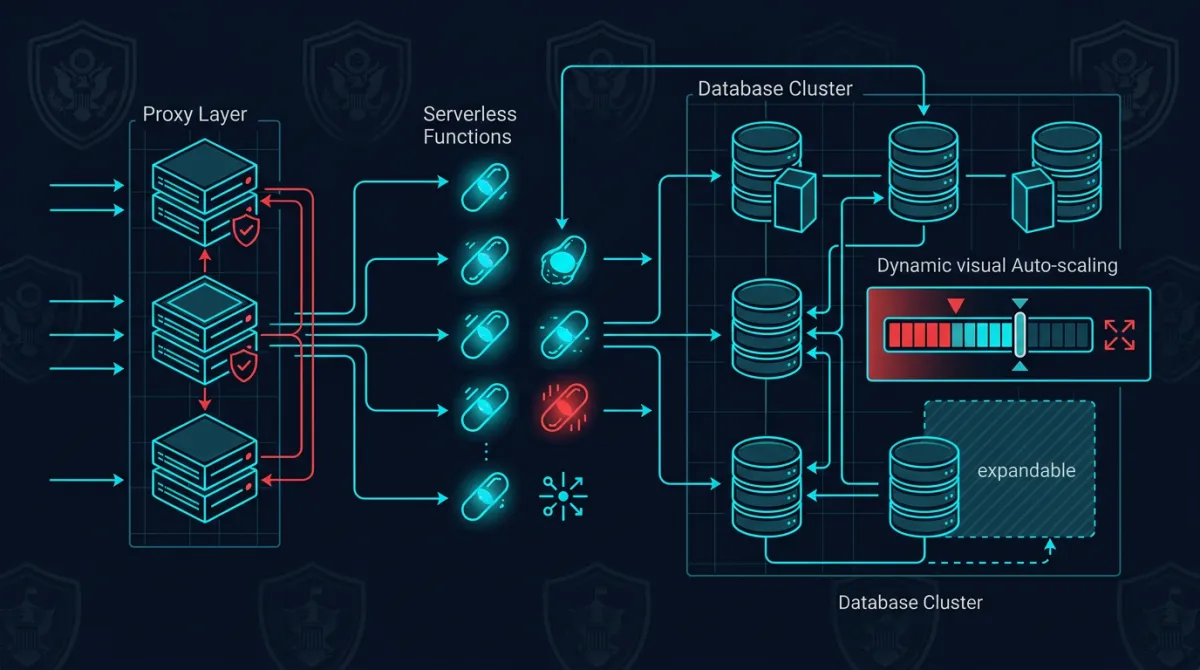
We run Aurora Serverless v2 (PostgreSQL-compatible) in production for a SaaS platform serving government-adjacent workloads. The platform processes requests through 24 Lambda functions, handles bursty traffic patterns that would be expensive to provision statically, and must meet strict data retention and encryption requirements.
After eighteen months in production, we have strong opinions about where Aurora Serverless v2 excels, where it demands careful attention, and why it’s become our default choice for new government workloads.
Why We Chose Aurora Serverless v2 Over RDS Provisioned
The decision came down to three factors: scaling behavior, cost profile, and operational overhead.
Scaling behavior. Government workloads are famously bursty — minimal weekend traffic, moderate business-hours load, sudden spikes when deadlines drive bulk submissions. With RDS provisioned instances, you either over-provision for peak (paying for idle capacity 80% of the time) or under-provision and risk degradation during spikes.
Aurora Serverless v2 scales in 0.5 ACU increments, responding to our traffic patterns without intervention. We set a minimum ACU floor high enough to avoid cold-start latency and a ceiling that caps maximum spend. The database scales itself between those bounds based on actual demand.
Cost profile. For our workload pattern — significant idle periods punctuated by intense bursts — Aurora Serverless v2 reduced our database costs substantially compared to an equivalently performant provisioned instance. We’re paying for actual consumption rather than reserved capacity. The math gets more favorable the burstier your workload is.
Operational simplicity. No instance type selection, no manual scaling events, no capacity planning exercises. When our traffic patterns changed (and they did — multiple times), we didn’t need to re-evaluate instance sizing. The database adapted. For a small engineering team managing production government systems, eliminating capacity planning as a recurring task is significant.
Connection Management with RDS Proxy
The biggest engineering challenge with Aurora Serverless v2 in a Lambda-based architecture is connection management. Each Lambda invocation can open a database connection, and during traffic spikes, you can easily exhaust PostgreSQL’s connection limit.
We solved this with RDS Proxy sitting between our Lambda functions and the Aurora cluster. Here’s the connection pattern we use in production:
import boto3
        import psycopg2
        import os

        def get_connection():
            client = boto3.client("rds")
            token = client.generate_db_auth_token(
                DBHostname=os.environ["DB_PROXY_ENDPOINT"],
                Port=5432,
                DBUsername=os.environ["DB_USERNAME"],
                Region=os.environ["AWS_REGION"],
            )
            return psycopg2.connect(
                host=os.environ["DB_PROXY_ENDPOINT"],
                port=5432,
                user=os.environ["DB_USERNAME"],
                password=token,
                dbname=os.environ["DB_NAME"],
                sslmode="require",
                sslrootcert="/opt/certs/rds-combined-ca-bundle.pem",
            )
Key decisions in this pattern:
- IAM database authentication instead of static credentials. The Lambda function’s execution role grants database access — no passwords stored in environment variables or secrets managers. This satisfies access control requirements and produces auditable authentication events in CloudTrail.
- SSL enforced via
sslmode=requirewith the RDS CA bundle. Encryption in transit is non-negotiable for government workloads, and this ensures every connection is encrypted regardless of how the proxy or cluster is configured at the network level. - Connection through the proxy endpoint, never directly to the Aurora cluster. The proxy handles connection pooling, multiplexing, and failover transparently.
RDS Proxy reduced our effective connection count by roughly 90% during peak traffic. Without it, we would have needed to implement application-level connection pooling across Lambda functions — a significantly more complex and fragile approach.
Our broader serverless API architecture follows similar patterns: let managed services handle the undifferentiated heavy lifting so engineering effort stays focused on the application domain.
Scaling Patterns in Production
After running Aurora Serverless v2 through multiple production cycles, we’ve observed scaling behaviors worth understanding:
Scale-up is fast, scale-down is gradual. Aurora Serverless v2 responds to increased load within seconds, adding ACUs as CPU, memory, or connection pressure increases. Scale-down is intentionally conservative — the cluster holds elevated capacity for a buffer period before reducing ACUs. This prevents oscillation during variable workloads but means you’ll pay for elevated capacity slightly longer than the spike that triggered it.
Minimum ACU floor matters more than you’d expect. We initially set our minimum ACU to 0.5, expecting the database to scale up quickly on first contact. It does — but the first few queries after a long idle period at minimum ACU showed higher latency than we wanted. We increased our minimum floor for production workloads to a level that keeps enough buffer pages in memory for our most common query paths. The marginal cost increase was worth the consistent response times.
Read replicas scale independently. We run a read replica for reporting queries, and its ACU consumption is decoupled from the writer. During bulk report generation, the replica scales up while the writer stays at baseline. This isolation prevents analytical workloads from impacting transactional performance — a critical property when the transactional system is serving real-time government operations.
These scaling characteristics align well with serverless cost optimization patterns we apply across our infrastructure. The key insight is that serverless doesn’t mean “no tuning” — it means tuning different parameters (ACU floors, proxy connection limits, timeout configurations) instead of instance types and Auto Scaling groups.
Backup, Recovery, and Data Retention
Government workloads carry strict requirements around data retention, backup integrity, and recovery time objectives. Aurora Serverless v2 handles the fundamentals well, but we augmented the defaults:
Continuous backup with point-in-time recovery. Aurora’s built-in continuous backup provides point-in-time recovery with 5-minute granularity and up to 35 days retention. We set retention to maximum and supplement with automated snapshot exports to S3 for long-term archival meeting federal records management requirements.
Cross-region snapshot copies. We automated cross-region snapshot copying on a schedule that meets our RPO requirements. Aurora handles re-encryption with a KMS key in the destination region transparently.
Automated restore testing. An automated process restores weekly from the latest snapshot into an isolated environment and runs validation queries. This has caught configuration drift that would have caused restore failures in a real disaster scenario.
Deletion protection and snapshot retention. Both are enabled in our Terraform configurations — accidental deletion of a production government database can have legal consequences, so multiple layers of protection are appropriate.
Our infrastructure is managed through Terraform multi-account patterns that enforce these backup and retention configurations as non-overridable defaults across all environments.
Encryption and Compliance Posture
Aurora Serverless v2 provides encryption at rest using AWS KMS by default — you can’t create an unencrypted Aurora Serverless v2 cluster. This is one of the few cases where AWS makes the secure option the only option, and we appreciate it.
Our encryption configuration goes beyond the defaults:
- Customer-managed KMS keys with key rotation enabled. We control the key lifecycle rather than relying on AWS-managed keys, which gives us the ability to audit key usage and revoke access if needed.
- Encryption in transit enforced at the cluster level via the
rds.force_sslparameter. Combined with thesslmode=requirein our connection pattern, this provides defense in depth — even if an application misconfigures its connection string, the cluster rejects unencrypted connections. - Audit logging via PostgreSQL’s
pgauditextension. Every data access query is logged with the executing role, timestamp, and affected objects. These logs feed into our centralized audit infrastructure and contribute to our compliance evidence generation. - VPC isolation with no public accessibility. The Aurora cluster, RDS Proxy, and Lambda functions all operate within private subnets. Database traffic never traverses the public internet.
This encryption and isolation posture aligns with event-driven architecture principles we follow: every component operates with least-privilege access, communicates over encrypted channels, and produces audit events as a natural byproduct of operation.
Where It Fits — and Where It Doesn’t
Aurora Serverless v2 isn’t universally optimal. Sustained high-throughput workloads with consistent, predictable load are often cheaper on provisioned instances with reserved pricing. If your database runs at 80%+ utilization consistently, provisioned wins on cost. Workloads requiring bleeding-edge PostgreSQL versions may also hit friction, since Aurora’s version support lags upstream by a release or two.
But for the majority of government cloud workloads — bursty, compliance-sensitive, operated by small teams — Aurora Serverless v2 is our default recommendation. Our migration from provisioned RDS required zero schema changes; extensions we rely on (pgcrypto, uuid-ossp, pgaudit) were all available. We ran the Serverless v2 cluster in parallel for two weeks to validate cost savings before committing.
It’s what we run in production, and it’s what we deploy for the systems we build through our cloud infrastructure practice.
Frequently Asked Questions
Is Aurora Serverless v2 available in AWS GovCloud regions?
Yes. Aurora Serverless v2 (PostgreSQL-compatible) is available in both GovCloud (US-West and US-East) regions. We deploy in GovCloud where contract requirements mandate it, using the same configurations we run in commercial regions. Feature parity is strong, though new capabilities sometimes arrive in commercial regions first.
How does Aurora Serverless v2 handle FedRAMP and CMMC compliance requirements?
Aurora Serverless v2 inherits the FedRAMP High authorization of the underlying AWS region (including GovCloud). For CMMC, the database itself is a component within your system boundary — compliance depends on how you configure encryption, access controls, audit logging, and network isolation. Our configuration enforces customer-managed KMS encryption, IAM authentication, forced SSL, and pgaudit logging, which maps well to the relevant NIST 800-171 control families.
What’s the actual cold start latency for Aurora Serverless v2 at minimum ACU?
At the lowest ACU setting (0.5), we observed initial query latencies of 200-400ms after extended idle periods, primarily due to buffer cache warming rather than a traditional “cold start.” At our production minimum floor (which we’ve tuned upward), first-query latency is consistently under 50ms. Aurora Serverless v2 doesn’t have the zero-to-running cold start that v1 had — the cluster is always running, but memory-dependent query performance varies with ACU level.
Can we use Aurora Serverless v2 with existing RDS tooling and monitoring?
Yes. Aurora Serverless v2 supports Performance Insights, Enhanced Monitoring, CloudWatch metrics, and standard PostgreSQL monitoring tools (pg_stat_statements, etc.). RDS Proxy adds its own CloudWatch metrics for connection pooling visibility. We monitor ACU consumption, connection counts, replication lag, and query performance through the same dashboards we’d use for provisioned Aurora.
How does failover work with Aurora Serverless v2 in a multi-AZ configuration?
Aurora’s storage layer replicates across three AZs by default. Adding a reader in a second AZ provides compute redundancy — failover promotes the reader to writer, typically completing in under 30 seconds. RDS Proxy handles connection draining and rerouting during failover, significantly reducing application-level disruption compared to DNS-based failover alone.
Discuss your project with Rutagon
Contact Us →