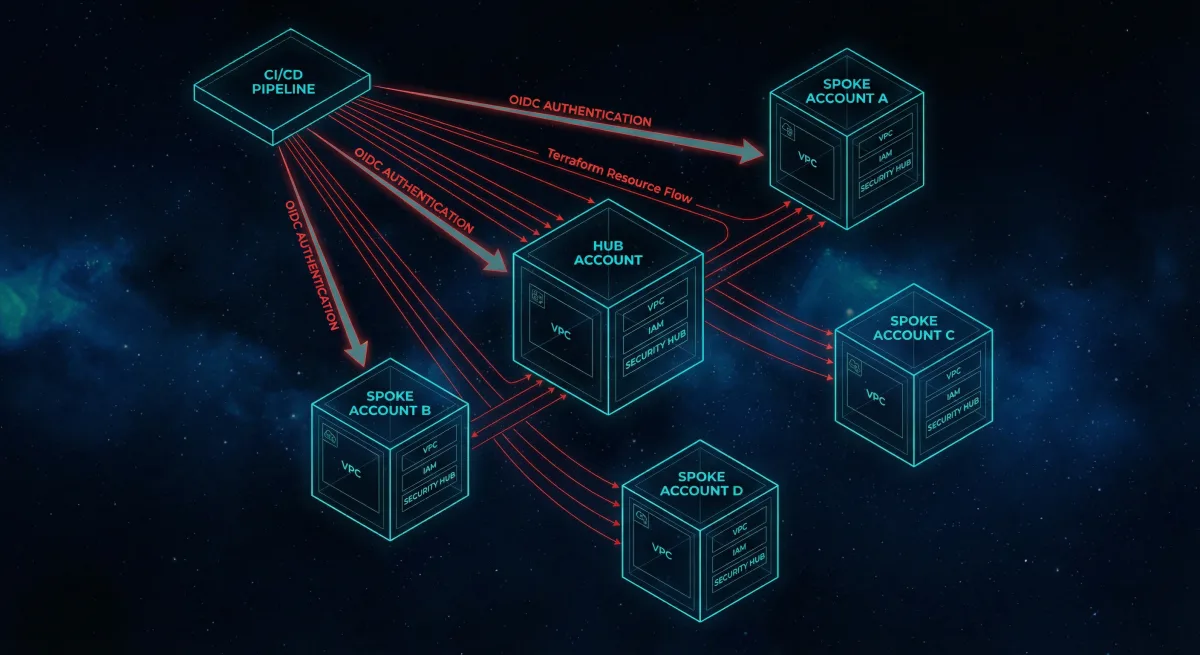
Most organizations start with a single AWS account. It works fine — until it doesn't. The moment you need environment isolation, separate billing, least-privilege access across teams, or a compliance boundary between workloads, a single account becomes a liability.
At Rutagon, we architect terraform multi-account AWS environments as a foundational layer for every cloud engagement. Whether we're standing up infrastructure for a production SaaS platform spanning 25+ AWS services or building our own internal systems with zero long-lived credentials, the pattern is the same: account segmentation, identity federation, centralized security, and cost control — all managed as code.
This article walks through the architecture we use in production, with real Terraform patterns you can adapt.
Why Multi-Account? The Case for Account Segmentation
A single AWS account creates blast radius problems. A misconfigured IAM policy in development can expose production data. A runaway Lambda in staging can burn through your budget before CloudWatch alerts fire. And when an auditor asks "show me your environment separation," pointing to naming conventions isn't going to cut it.
AWS Organizations solves this by providing hard boundaries between workloads. Each account is an isolation boundary for IAM, networking, billing, and service quotas.
Here's how we segment:
| Account | Purpose | Key Services |
|---|---|---|
| Management | Organization root, billing, SCPs | AWS Organizations, IAM Identity Center |
| Security | Centralized logging, GuardDuty, Config | CloudTrail, SecurityHub, GuardDuty |
| Shared Services | DNS, container registries, shared tooling | Route 53, ECR, Terraform state |
| Development | Dev workloads, experimentation | ECS, Lambda, DynamoDB |
| Staging | Pre-production validation | Mirrors production stack |
| Production | Customer-facing workloads | EKS, CloudFront, RDS, WAF |
This isn't theoretical. Our internal infrastructure runs on this exact pattern. Every Rutagon project — from our content platform to our production SaaS platform — deploys through isolated accounts with Terraform managing the entire lifecycle.
Terraform Organization Bootstrap
The foundation starts with aws_organizations_organization and a set of organizational units (OUs). We use a dedicated bootstrap Terraform workspace that only the management account touches.
resource "aws_organizations_organization" "org" {
  aws_service_access_principals = [
    "cloudtrail.amazonaws.com",
    "config.amazonaws.com",
    "guardduty.amazonaws.com",
    "sso.amazonaws.com",
  ]

  enabled_policy_types = [
    "SERVICE_CONTROL_POLICY",
    "TAG_POLICY",
  ]

  feature_set = "ALL"
}

resource "aws_organizations_organizational_unit" "workloads" {
  name      = "Workloads"
  parent_id = aws_organizations_organization.org.roots[0].id
}

resource "aws_organizations_organizational_unit" "security" {
  name      = "Security"
  parent_id = aws_organizations_organization.org.roots[0].id
}

resource "aws_organizations_account" "production" {
  name      = "rutagon-production"
  email     = "aws+production@rutagon.com"
  parent_id = aws_organizations_organizational_unit.workloads.id

  lifecycle {
    ignore_changes = [name, email]
  }
}
The lifecycle block on accounts is deliberate — AWS doesn't allow renaming accounts after creation, and Terraform will try to recreate them if the name drifts. Ignoring those fields prevents accidental account destruction. This is the kind of production lesson you only learn once.
OIDC-Based CI/CD: Zero Long-Lived Credentials
Long-lived AWS access keys in CI/CD pipelines are a security incident waiting to happen. They get committed to repos, stored in plaintext pipeline variables, and never rotated. We eliminated them entirely.
Every Rutagon CI/CD pipeline authenticates to AWS using OpenID Connect (OIDC) federation. GitLab CI issues a short-lived JWT, AWS validates it against the OIDC provider, and the pipeline assumes a scoped IAM role — no secrets stored anywhere.
resource "aws_iam_openid_connect_provider" "gitlab" {
  url             = "https://gitlab.com"
  client_id_list  = ["https://gitlab.com"]
  thumbprint_list = [data.tls_certificate.gitlab.certificates[0].sha1_fingerprint]
}

resource "aws_iam_role" "ci_deploy" {
  name = "gitlab-ci-deploy"

  assume_role_policy = jsonencode({
    Version = "2012-10-17"
    Statement = [
      {
        Effect = "Allow"
        Principal = {
          Federated = aws_iam_openid_connect_provider.gitlab.arn
        }
        Action = "sts:AssumeRoleWithWebIdentity"
        Condition = {
          StringEquals = {
            "gitlab.com:sub" = "project_path:rutagon/infrastructure:ref_type:branch:ref:main"
          }
        }
      }
    ]
  })
}

resource "aws_iam_role_policy_attachment" "ci_deploy" {
  role       = aws_iam_role.ci_deploy.name
  policy_arn = aws_iam_policy.deploy_permissions.arn
}
The Condition block is critical. It scopes the role assumption to a specific GitLab project and branch. A pipeline running on a feature branch in a different repo cannot assume this role. This is "Security Is Architecture" in practice — the access control is baked into the infrastructure definition, not bolted on as a policy afterthought.
We covered the broader security automation pattern — including vulnerability scanning and compliance gates — in our article on Security Compliance CI/CD Automation.
Centralized Logging and Security
Every account in the organization ships logs to the Security account. CloudTrail captures API activity, AWS Config records resource state, and GuardDuty monitors for threats. Centralizing these into a single account means no workload account can tamper with its own audit trail.
resource "aws_cloudtrail" "org_trail" {
  name                       = "org-trail"
  s3_bucket_name             = aws_s3_bucket.cloudtrail_logs.id
  is_organization_trail      = true
  is_multi_region_trail      = true
  enable_log_file_validation = true
  kms_key_id                 = aws_kms_key.cloudtrail.arn

  event_selector {
    read_write_type           = "All"
    include_management_events = true
  }
}
Setting is_organization_trail = true automatically captures events from every account in the organization. Combined with AWS Security Hub aggregating findings across accounts, the Security account becomes a single pane of glass for the entire organization.
For teams running containerized workloads in regulated environments, this centralized logging architecture integrates directly with the EKS patterns we described in Kubernetes in Regulated Environments.
Service Control Policies: Guardrails as Code
Service Control Policies (SCPs) are the organizational guardrails that prevent accounts from doing things they shouldn't — regardless of what IAM policies exist within those accounts. We apply SCPs at the OU level so they cascade to all member accounts.
resource "aws_organizations_policy" "deny_regions" {
  name        = "deny-unapproved-regions"
  description = "Restrict workloads to approved AWS regions"
  type        = "SERVICE_CONTROL_POLICY"

  content = jsonencode({
    Version = "2012-10-17"
    Statement = [
      {
        Sid       = "DenyUnapprovedRegions"
        Effect    = "Deny"
        Action    = "*"
        Resource  = "*"
        Condition = {
          StringNotEquals = {
            "aws:RequestedRegion" = ["us-west-2", "us-east-1", "us-gov-west-1"]
          }
        }
      }
    ]
  })
}

resource "aws_organizations_policy_attachment" "workloads_region_lock" {
  policy_id = aws_organizations_policy.deny_regions.id
  target_id = aws_organizations_organizational_unit.workloads.id
}
This SCP ensures no workload account can spin up resources outside of approved regions — a common requirement in government environments where data residency matters. The policy is version-controlled, peer-reviewed, and applied automatically. No one can "just quickly" launch an EC2 instance in ap-southeast-1.
For organizations migrating from other cloud providers into this kind of controlled AWS environment, we documented the migration playbook in GCP to AWS Migration for Government.
Cost Optimization: Visibility Before Optimization
Multi-account architecture gives you cost visibility for free. Each account generates its own billing data, making it trivial to attribute costs to specific environments or projects.
We layer on additional controls:
- AWS Budgets per account with alerts at 80% and 100% thresholds
- Cost allocation tags enforced via Tag Policies at the organization level
- Reserved capacity planning managed from the management account to aggregate savings across all accounts
- Scheduled scaling — dev and staging environments scale down outside business hours
resource "aws_budgets_budget" "account_monthly" {
  for_each = toset(["development", "staging", "production"])

  name         = "${each.key}-monthly-budget"
  budget_type  = "COST"
  limit_amount = var.budget_limits[each.key]
  limit_unit   = "USD"
  time_unit    = "MONTHLY"

  notification {
    comparison_operator       = "GREATER_THAN"
    threshold                 = 80
    threshold_type            = "PERCENTAGE"
    notification_type         = "ACTUAL"
    subscriber_email_addresses = [var.ops_email]
  }
}
The for_each pattern keeps the configuration DRY while applying appropriate budget thresholds per environment. Production gets a higher limit; development gets a tight leash. Start Small, Think Big — control costs early so you can invest in the infrastructure that matters.
Cross-Account Access with Terraform Providers
One of the more nuanced challenges in multi-account Terraform is managing resources across accounts from a single pipeline. We use provider aliases with assume_role to deploy into target accounts without storing credentials for each one.
provider "aws" {
  alias  = "production"
  region = "us-west-2"

  assume_role {
    role_arn = "arn:aws:iam::${var.production_account_id}:role/terraform-deploy"
  }
}

resource "aws_s3_bucket" "app_assets" {
  provider = aws.production
  bucket   = "rutagon-app-assets-prod"
}
The CI/CD pipeline assumes the initial OIDC role, then cascades into target accounts using sts:AssumeRole. Each target account has a terraform-deploy role with least-privilege permissions scoped to exactly what Terraform needs to manage. No admin access. No wildcard policies. Every permission is justified and auditable.
The Architecture in Context
This multi-account pattern isn't just infrastructure for its own sake. It's the foundation that lets everything else work safely: containerized workloads in regulated environments, automated security compliance in CI/CD, and the AWS cloud infrastructure capabilities we deliver to clients.
When a contracting officer asks, "How do you manage environment isolation?" — the answer isn't a slide deck. It's this architecture, running in production, managed as code, with every change tracked in version control. Ship, Don't Slide.
What is terraform multi-account AWS architecture and why does it matter?
Terraform multi-account AWS architecture uses Infrastructure as Code to manage multiple AWS accounts within an AWS Organization. Each account serves as a hard isolation boundary for IAM, networking, and billing — eliminating blast radius risk between environments. For regulated workloads, this provides the environment segmentation that auditors and contracting officers require without relying on naming conventions or manual configuration.
How does OIDC-based CI/CD eliminate credential risk in AWS deployments?
OIDC federation replaces long-lived AWS access keys with short-lived tokens issued per pipeline run. The CI platform (GitLab, GitHub Actions) issues a signed JWT, AWS validates it against a registered OIDC provider, and the pipeline assumes a scoped IAM role. Credentials exist only for the duration of the deployment, are never stored in pipeline variables, and are automatically scoped to specific projects and branches via IAM conditions.
How do Service Control Policies differ from IAM policies in a multi-account setup?
IAM policies define what a principal can do within an account. Service Control Policies define the maximum permissions available to an entire account — they act as a ceiling that IAM policies cannot exceed. Even if an account has an IAM admin user, an SCP denying access to unapproved regions will override it. SCPs are applied at the Organizational Unit level and cascade to all member accounts, making them the primary guardrail mechanism for multi-account governance.
Can Terraform manage resources across multiple AWS accounts from a single pipeline?
Yes. Using provider aliases with assume_role configuration, a single Terraform workspace can deploy resources into multiple target accounts. The pipeline authenticates once via OIDC, then assumes scoped deployment roles in each target account. Each role follows least-privilege principles — Terraform only gets the permissions required to manage the specific resources defined in the configuration, not blanket admin access.
What cost optimization strategies work best in a multi-account AWS Organization?
Account-level isolation provides natural cost attribution — each account's billing data maps directly to an environment or project. Layer on AWS Budgets with threshold alerts, Tag Policies enforced at the organization level for cost allocation, Reserved Instance purchasing aggregated at the management account for cross-account savings, and scheduled scaling to power down non-production environments outside business hours. The key is visibility first: you can't optimize what you can't attribute.
Discuss your project with Rutagon
Contact Us →