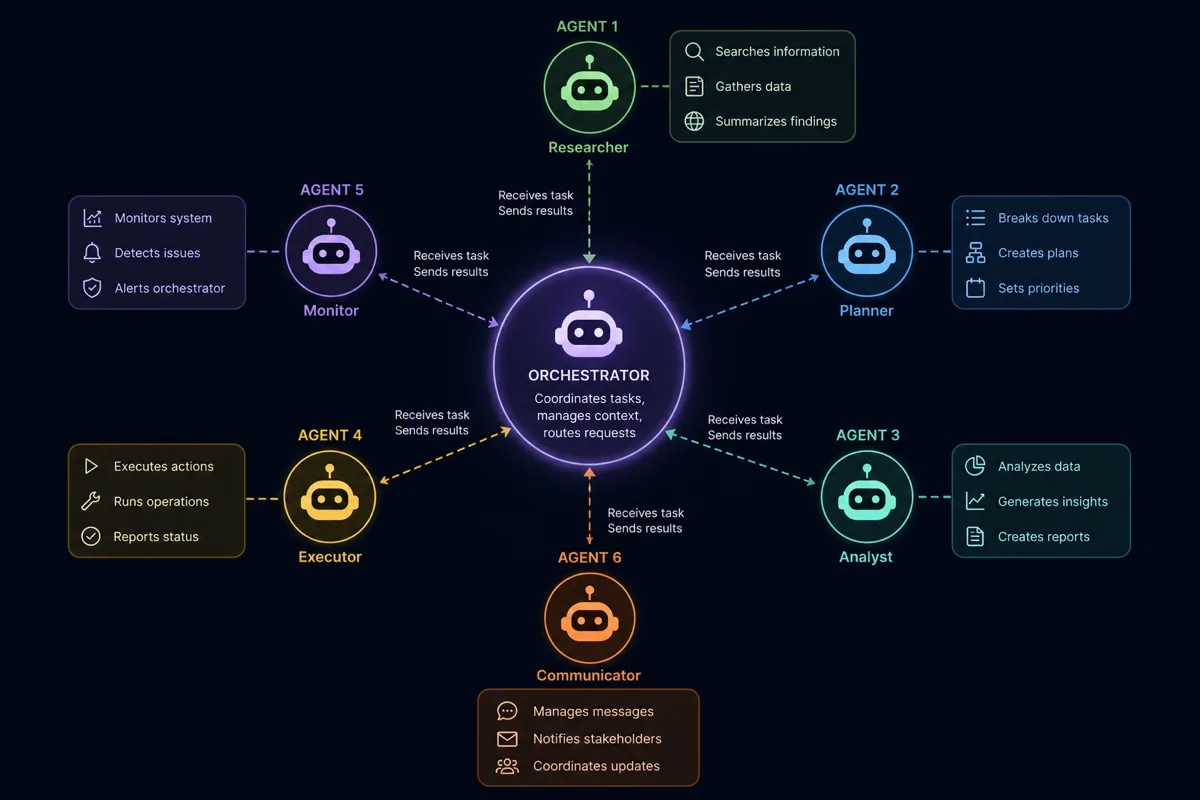
Multi-agent AI systems demo well and fail in production for a predictable reason: nobody designs for what happens when an agent calls a tool that fails, gets stuck in a reasoning loop, or produces output that doesn't match what the next step in the pipeline expects. Here's the orchestration framework we use to build agent systems that survive contact with real-world messiness.
Single Agent vs. Multi-Agent: When Each Makes Sense
Not every problem needs multiple agents. We default to a single well-scoped agent with a clear tool set unless the task genuinely decomposes into specialized sub-tasks that benefit from separate reasoning contexts — for example, a "research agent" that gathers information and a separate "writing agent" that synthesizes it, where mixing both responsibilities in one context degrades output quality.
The Orchestration Pattern
We structure multi-agent systems around a central orchestrator that routes tasks, rather than letting agents communicate peer-to-peer, which becomes unpredictable and hard to debug at scale:
class AgentOrchestrator:
    def __init__(self, agents: dict[str, Agent]):
        self.agents = agents
        self.max_retries = 3

    def execute_task(self, task: Task) -> TaskResult:
        agent = self.agents[task.agent_type]
        for attempt in range(self.max_retries):
            try:
                result = agent.run(task, timeout=30)
                if self.validate_output(result, task.expected_schema):
                    return result
                task.add_context(f"Previous attempt failed validation: {result.errors}")
            except ToolExecutionError as e:
                task.add_context(f"Tool call failed: {e}. Try an alternative approach.")
        return TaskResult(status="failed", requires_human_review=True)
Tool Calling: Design for Failure, Not Just the Happy Path
Every tool an agent can call needs explicit failure handling. An agent calling an external API that times out shouldn't hang indefinitely or silently give up — it should receive structured error feedback it can reason about, with a bounded number of retries before escalating to a human.
def execute_tool_call(tool_name: str, arguments: dict) -> ToolResult:
    tool = TOOL_REGISTRY[tool_name]
    try:
        result = tool.invoke(arguments, timeout=tool.timeout_seconds)
        return ToolResult(success=True, data=result)
    except TimeoutError:
        return ToolResult(success=False, error="timeout", retryable=True)
    except ValidationError as e:
        return ToolResult(success=False, error=str(e), retryable=False)
Memory: Short-Term Context vs. Long-Term State
Agents need two distinct kinds of memory, and conflating them causes problems. Short-term context (the current conversation or task's working memory) lives in the prompt window and resets per task. Long-term state (facts learned across sessions, user preferences, prior decisions) needs external persistence — typically a vector store for semantic recall plus a structured database for facts that need exact retrieval, like "what did we decide about this customer's billing tier last month."
Preventing Runaway Reasoning Loops
Agents left unchecked can loop — repeatedly calling the same tool with slightly different arguments, hoping for a different result. We enforce a hard step budget per task and a circuit breaker that halts execution and escalates to human review if the agent calls the same tool with materially similar arguments more than twice in a row.
Observability: You Can't Debug What You Can't See
Every agent decision, tool call, and intermediate reasoning step gets logged with a trace ID that ties the entire task execution together — essential for debugging why an agent produced a specific output three steps into a chain, not just what the final output was.
Results
For a client automating a multi-step research and reporting workflow, this orchestration framework reduced silent failures (tasks that appeared to complete but produced garbage output) to near zero, since validation gates catch malformed output before it propagates, and the circuit breaker pattern eliminated the runaway API cost incidents they'd experienced with their earlier unstructured agent prototype.
Building an agentic workflow that needs to actually be reliable? Discuss your automation project — 907-841-8407 or contact@rutagon.com.
Frequently Asked Questions
When should I use multiple AI agents instead of one?
Multiple agents make sense when a task genuinely decomposes into specialized sub-tasks that benefit from separate reasoning contexts, like separating research from writing. If a single well-scoped agent with the right tools can handle the task, adding more agents typically adds complexity without benefit.
How do you prevent an AI agent from getting stuck in a loop?
We enforce a hard step budget per task and a circuit breaker that halts execution if an agent calls the same tool with materially similar arguments repeatedly, escalating to human review instead of burning API calls indefinitely.
What happens when a tool an agent calls fails or times out?
Well-designed tool integrations return structured error information the agent can reason about, with a bounded retry count before the task escalates to human review rather than the agent looping indefinitely or the system failing silently.
How do AI agents maintain memory across sessions?
Short-term working memory lives in the prompt context and resets per task. Long-term memory — facts and decisions that need to persist across sessions — requires external storage, typically a combination of a vector store for semantic recall and a structured database for exact-match facts.
How do you debug why a multi-agent system produced a wrong output?
Comprehensive tracing that logs every agent decision, tool call, and intermediate step under a shared trace ID is essential. Without this, diagnosing a multi-step agent failure becomes guesswork.